
PHASE Control is on the Home Assistant Marketplace (and it's free)
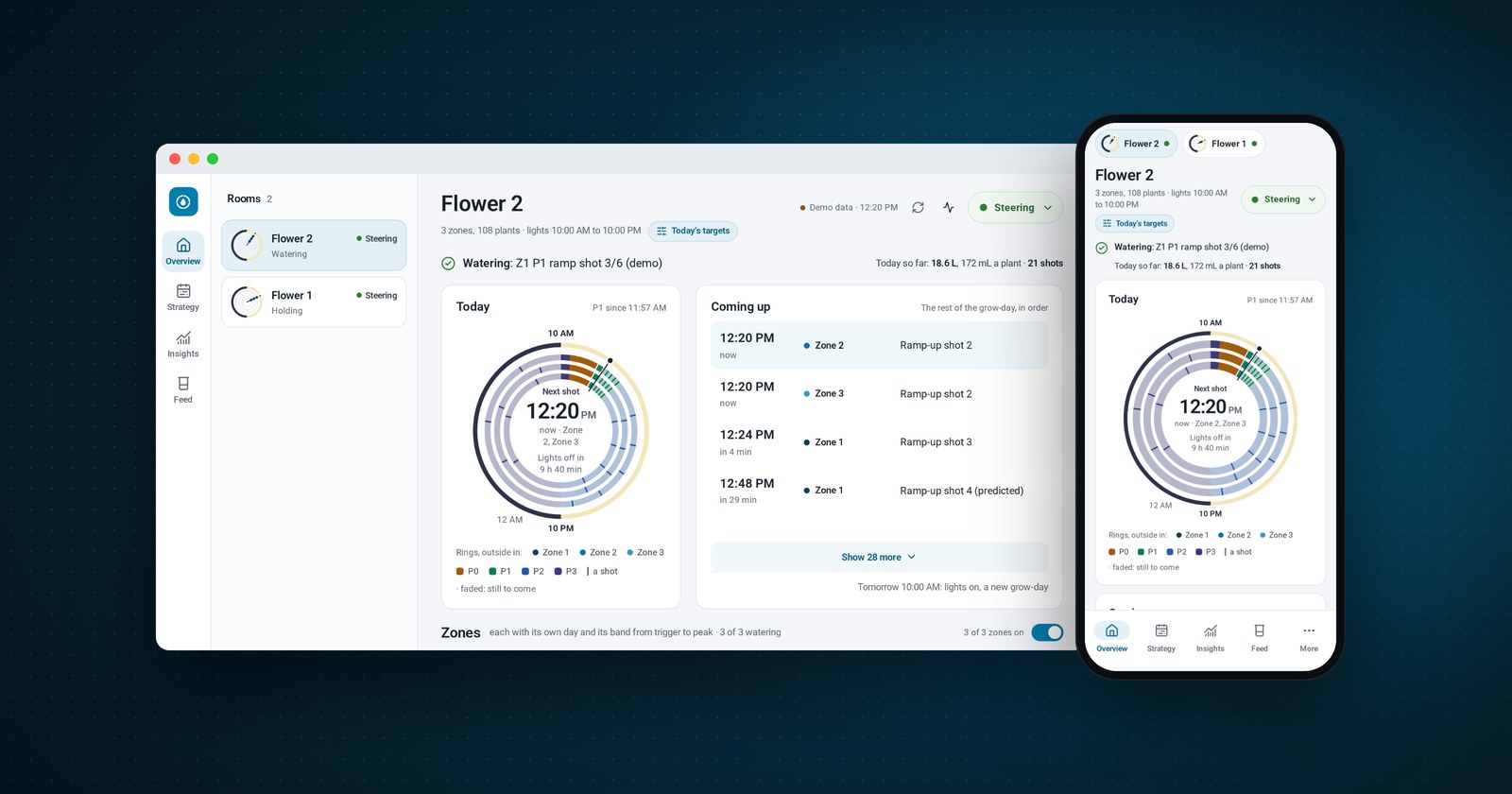
PHASE Control is on the Home Assistant Marketplace! Our open-source crop steering system is now one search away for every grower running Home Assistant.
Today's a big day for us, and we reckon it's an even bigger one for growers. For years, crop steering has mostly lived inside pricey commercial controllers and monthly subscriptions. Not any more. PHASE Control takes about five minutes to set up, it works with the pumps, valves and probes you've already got, and just like everything else we make, it won't cost you a cent.
Quick intro: What's PHASE Control?
PHASE stands for Precision Hydration And Steering Engine. It's an open-source agronomic farming system that runs your irrigation by the numbers. Every minute, it reads each zone's moisture and EC probes, works out whether that zone needs a shot and how big, then runs your pump and valves to deliver it.
It steers through the same four-phase day that crop steerers already know:
- P0, the morning dryback. The lights come on, and the plants start drinking before the first shot goes in.
- P1, the ramp. Small shots, spaced out, building up to your peak target.
- P2, maintenance. A top-up every time moisture falls to your trigger.
- P3, the overnight dryback. Watering stops, and each zone dries back to your target and is held there until lights-on.
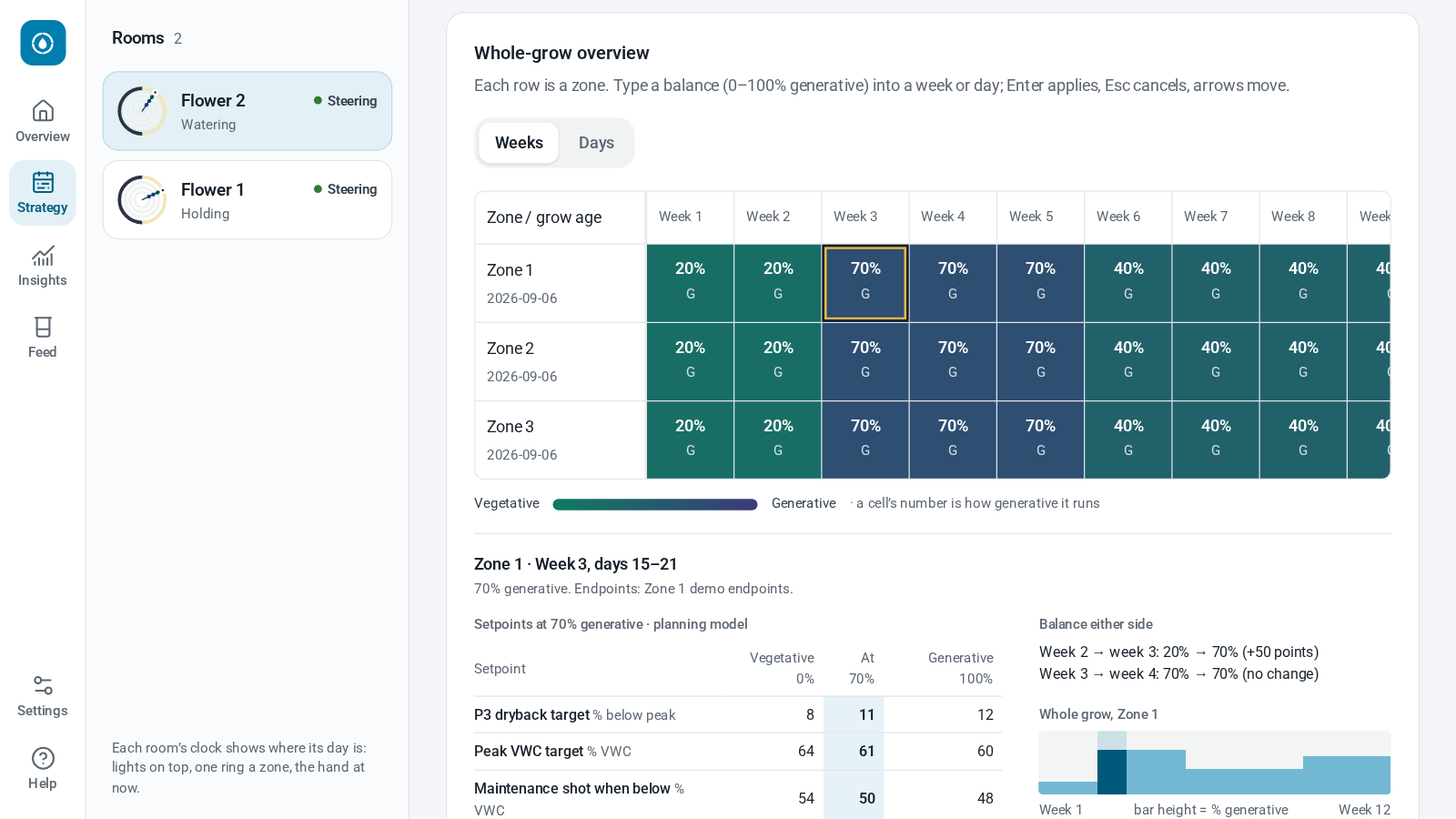
Steer each zone between vegetative and generative, week by week across the whole grow, and the targets change over at lights-on.
PHASE Control also complements our GRACe Portal, the open-source compliance system we built for cultivators. GRACe keeps your records in order, and PHASE Control keeps your plants watered. Both run right inside Home Assistant, both keep your data on your own box, and both are free.
Standing on LegacyAg's shoulders
Everything in this post builds on LegacyAg's work. They brought proper crop steering to Home Assistant, built the four-phase engine and irrigation strategies that make it tick, and released the lot as open source for every grower to use. We've learned a heap from them, and we're proud to keep building alongside them.
A few months back, we forked it so we could test it hard in our own rooms and try out some ideas of our own. Four things have driven everything we've done since:
- Point and click, start to finish. We rebuilt the setup wizard from the ground up, so it asks only for the basics and gets you going fast. From the Marketplace to watering your first room, you never touch YAML, a terminal or an access token. You pick your valves, pumps and probes from lists, and every save is checked before it changes anything.
- No AI. Anywhere. We removed any and all AI involvement. Every decision comes from your setpoints and repeatable, predictable maths, and it comes out the same every time. More on that below.
- Tested like it matters. Every change is tested inside a real Home Assistant, on three different versions, before it ships. And every update goes to our own rooms before it goes to anyone else's.
- Clear on every screen. We overhauled the whole UI, so it's consistent on your computer, tablet and phone. The important information sits front and centre, like what each zone is doing and when its next shot is due, and accessibility improvements throughout make it easier for everyone to read and use.
LegacyAg has been just as generous since, welcoming more than two dozen of our changes into their own project, from error codes with built-in help and settings explained in growers' words to a complete overhaul of the dashboard, which we've kept refining since. That's open source at its best: everyone builds on everyone else's work, and every grower comes out ahead.
No AI, just maths you can check
This one matters to us. An AI can be confidently wrong, and your plants can't wait around for an apology. So there are no language models, no AI judges tweaking your setpoints, and no AI assistant connectors. Instead, PHASE Control runs on rules and arithmetic you can check with a calculator:
- A shot is a percentage of your substrate. A 3% shot across 40 plants with 5 L of substrate each is 6 L of water.
- Your drippers decide how long it runs. Those 6 L, through 40 drippers at 4 L an hour each, take 2 minutes and 15 seconds.
- Dryback is a share of the day's peak. A 40% dryback from an 80% peak ends at 48% (80 × 0.6), not at 40%.
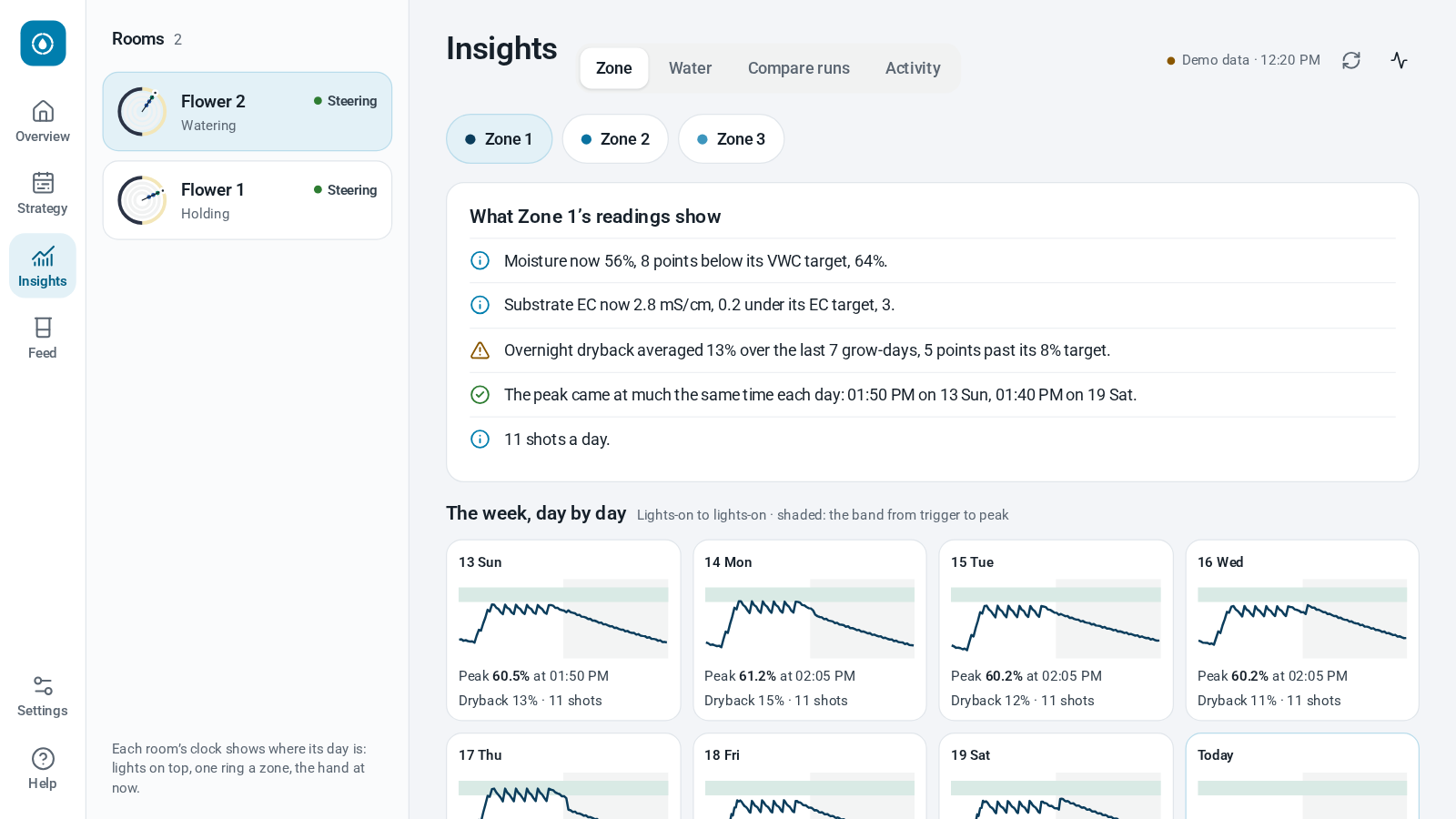
Same readings, same settings, same time of day: same decision, every single time. The dashboard shows you the numbers behind each one, and the controller's log spells out, minute by minute and in plain English, what each zone is doing and why. Even Auto setpoints (off unless you switch it on) works by fixed rules, in small, bounded steps.
What's new since we forked
Besides those four, here's a taste of what's landed:
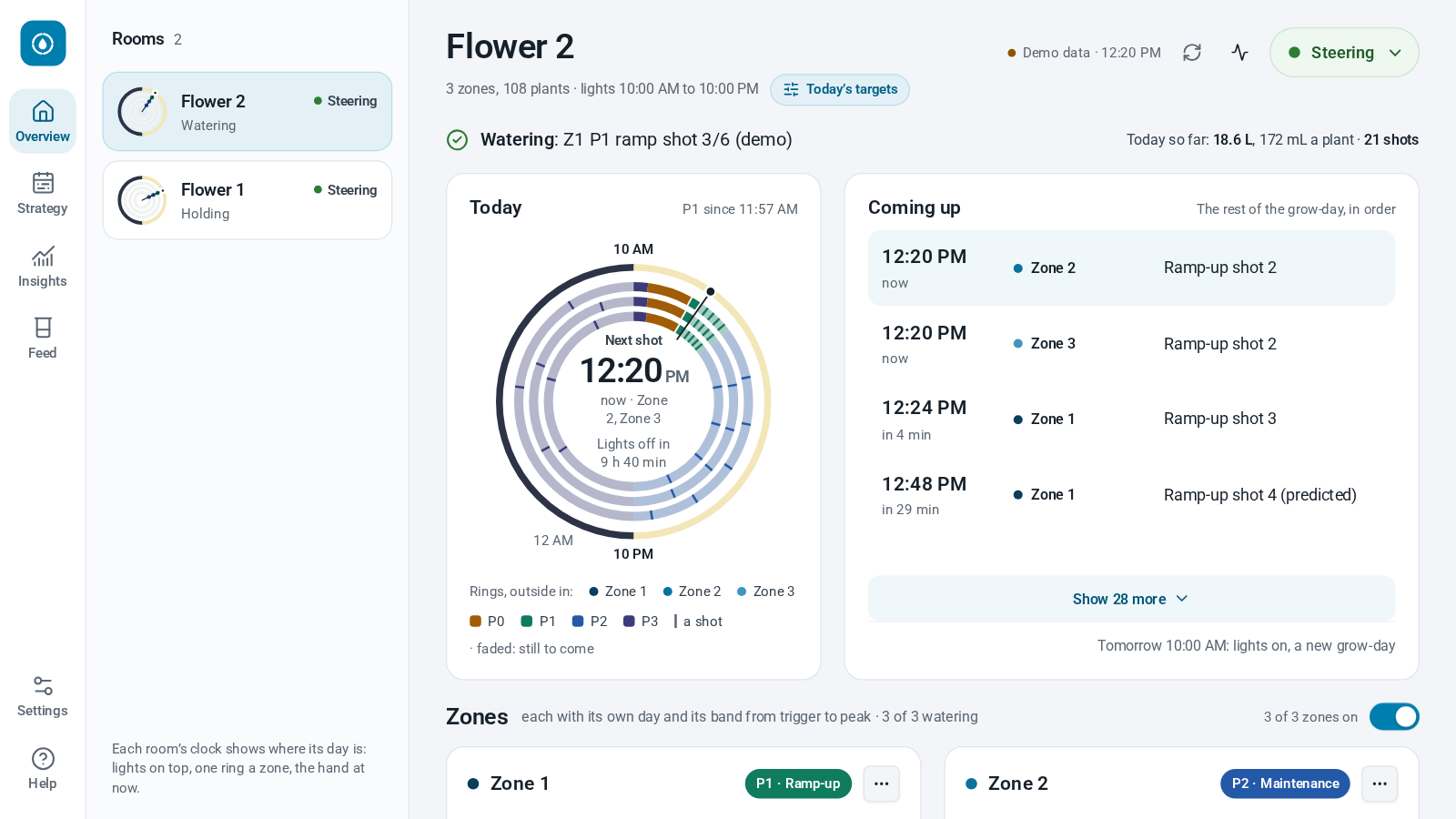
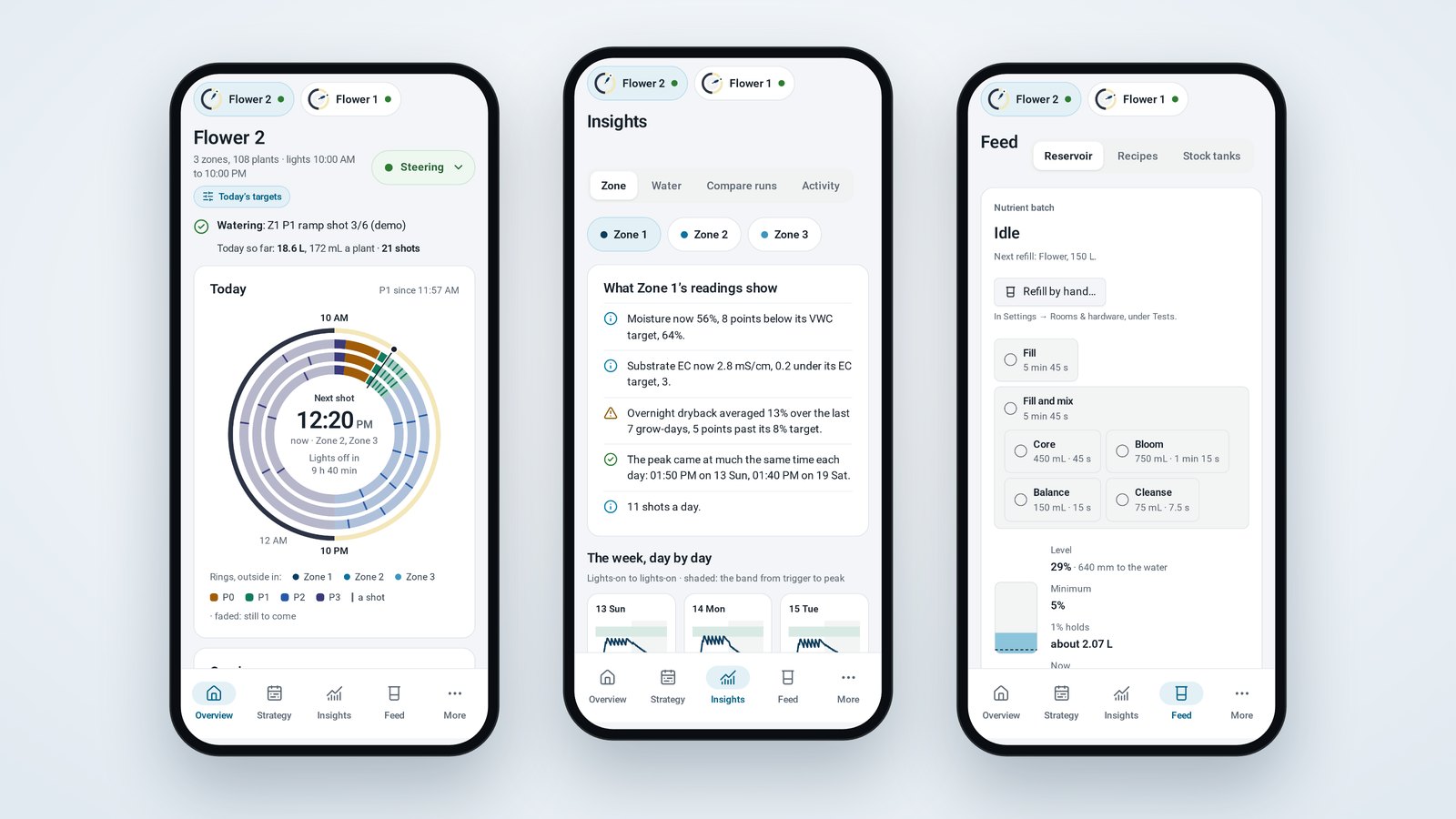
- Your whole grow-day on one clock. A ring for each zone, every shot marked, and what's coming up next. Every zone gets a card with its own day, too.
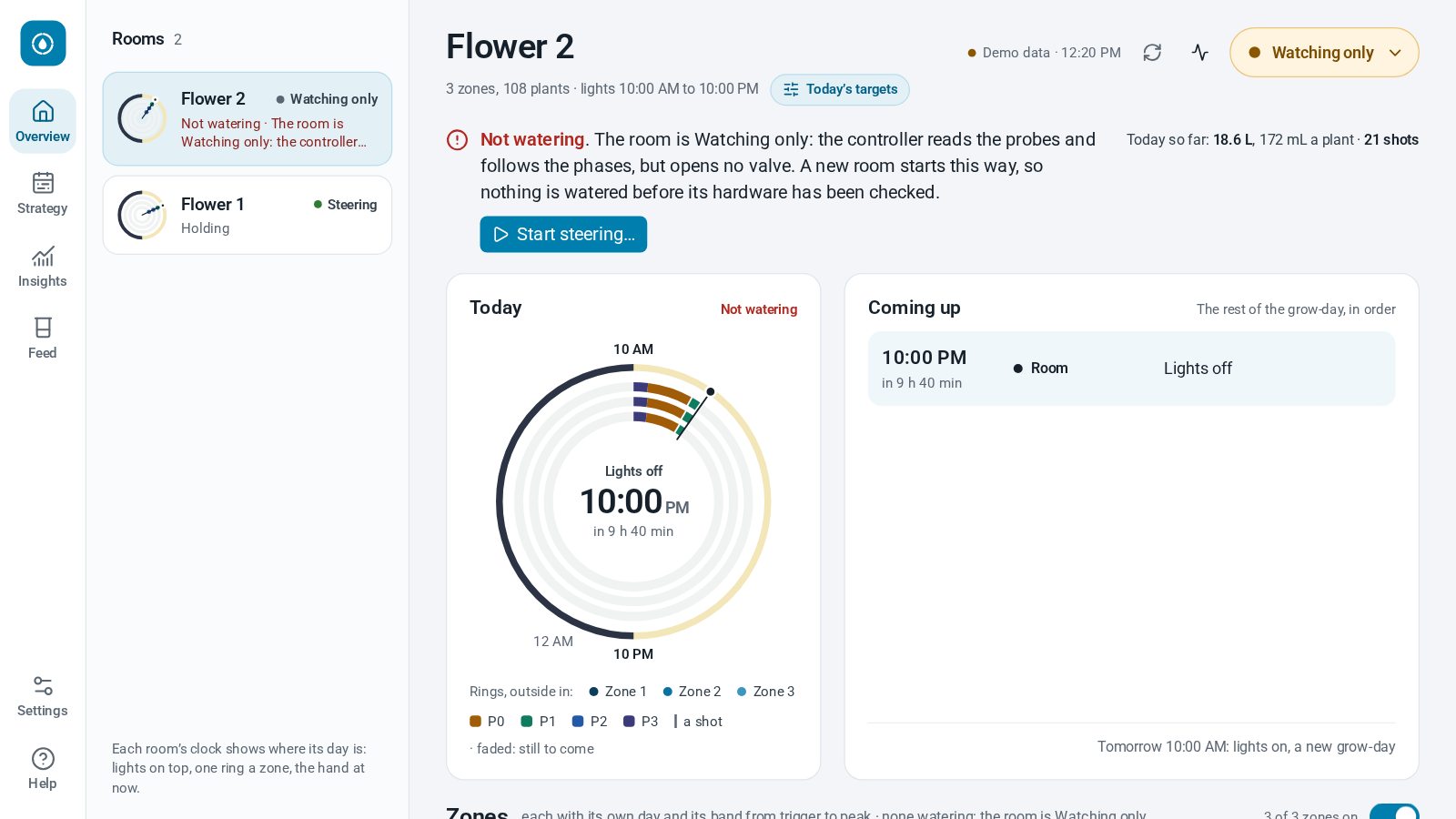
- One choice for how a room runs. Steering, Watching only or Room off. No more hunting for the right pair of switches.
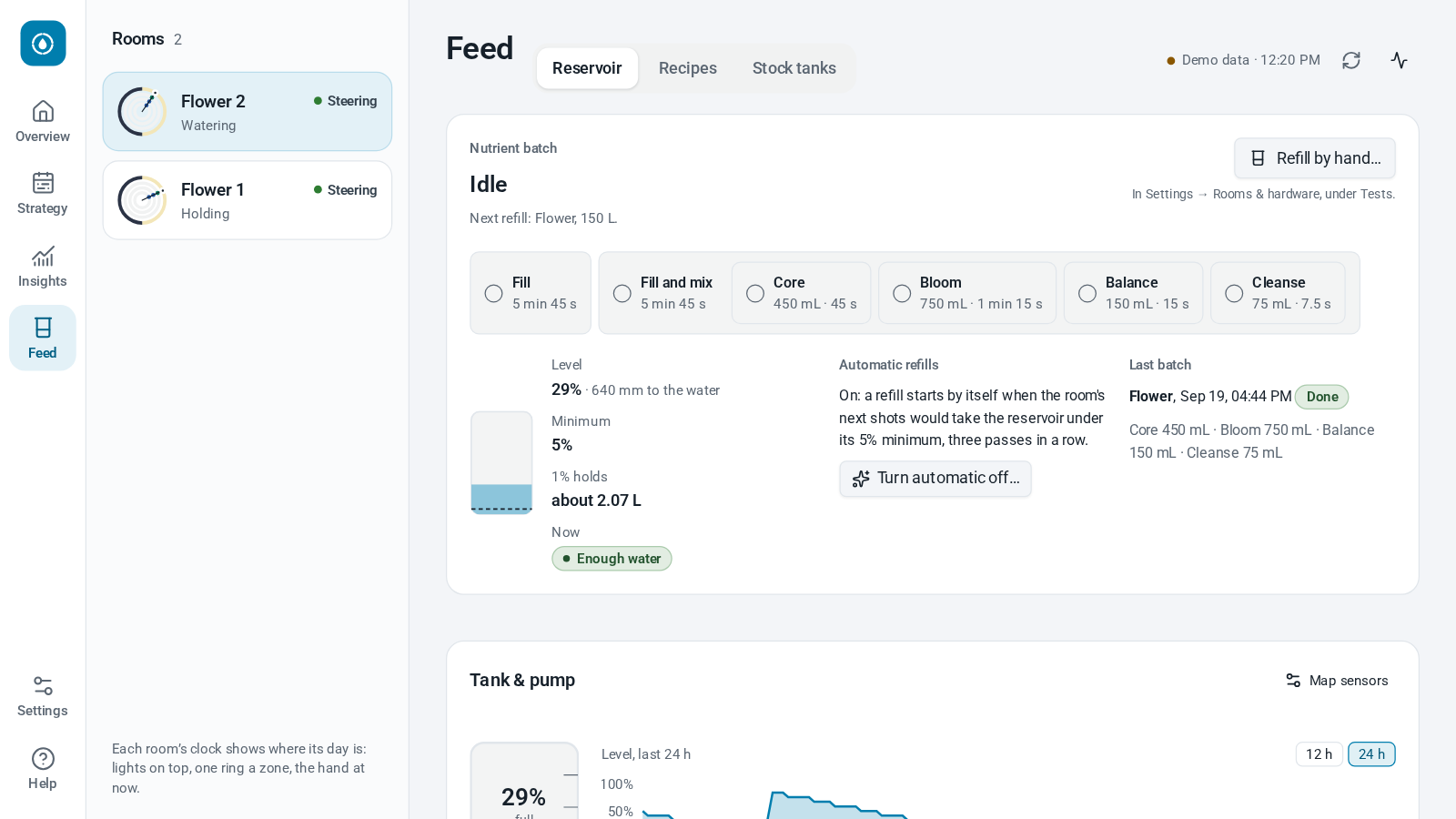
- Nutrient batches. Map your reservoir and dosers, and refills look after themselves: the tank fills, your dosers add each nutrient in turn, and it all gets mixed. Feed recipes and stock tank levels come with it, plus a heads-up on when you'll need the next refill.
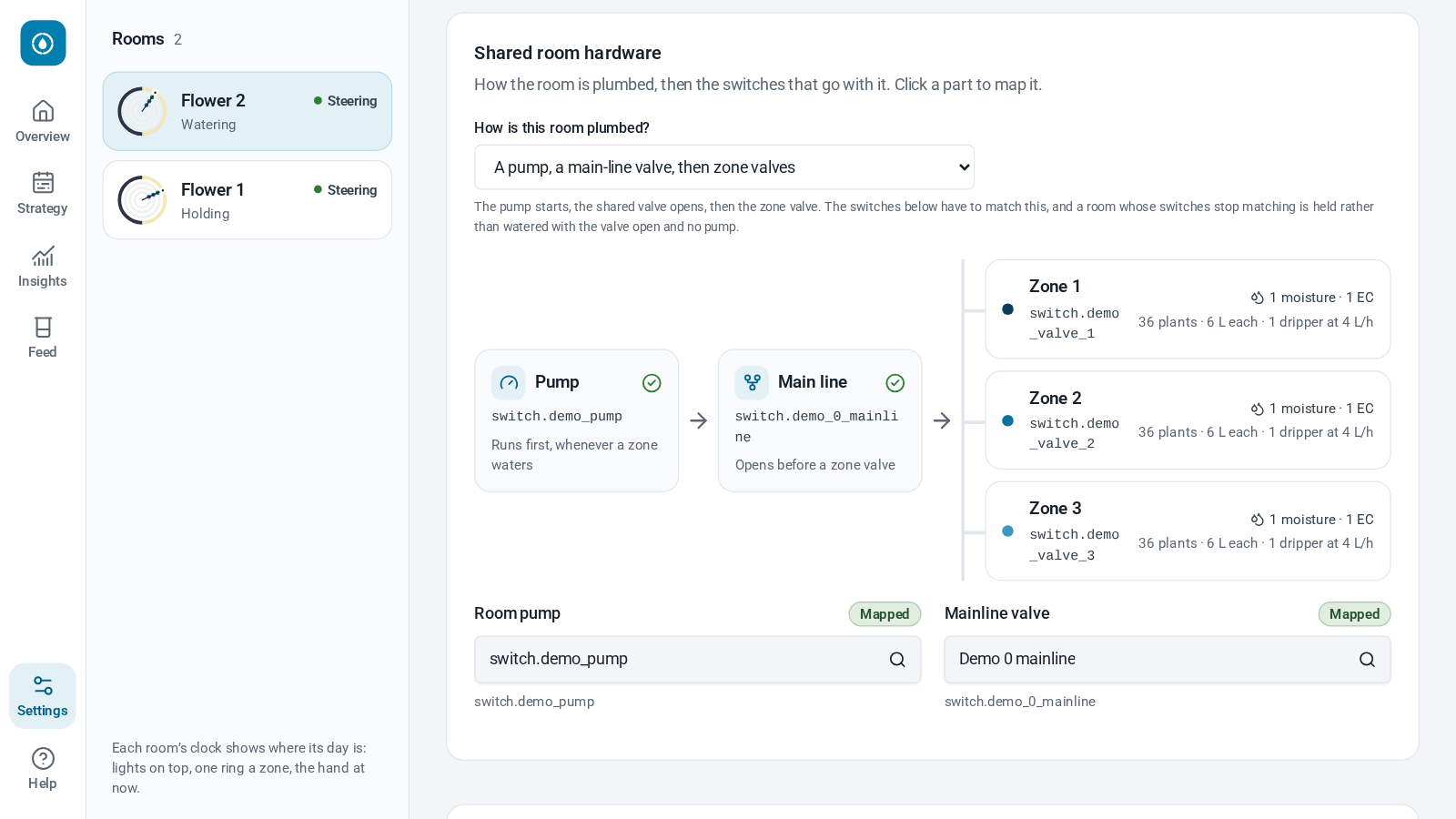
- One valve, many zones. Rooms where a single fertigation valve feeds every zone work too. Each zone keeps its own probes, and they share every shot.
- Overnight drybacks that hold. P3 dries each zone back to your target, then holds it there with small shots instead of letting it run past.
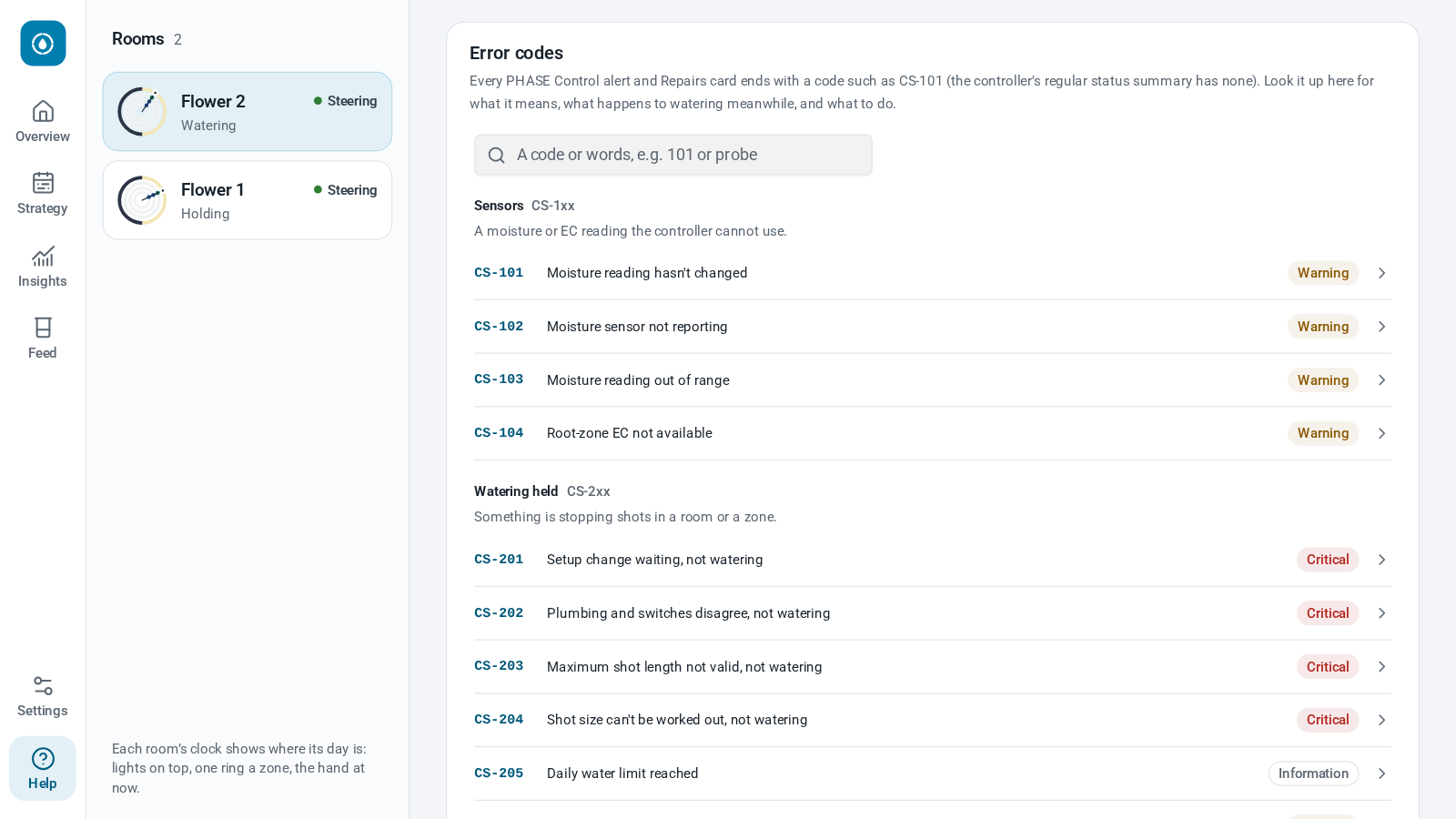
- Alerts you can act on. Every alert carries a code, and the built-in Help explains what it means, what happens to watering in the meantime, and what to do about it.
- Share your targets. Export a room's targets, then import them into another room, or send them to a mate.
Here's how it all looks today. Have a swipe through:
Five minutes, and the hardware you've already got
No fancy controller required, and nothing to rip out. If Home Assistant can switch it, PHASE Control can water with it: a smart plug on a pump in a tent, solenoids on a manifold, or a whole room of pumps, valves and dosers. Any moisture probe Home Assistant can read will do (plus EC, if you've got it), and you can give a zone several probes.
Getting going takes about five minutes. Our install video runs for two and a half.
All you need is Home Assistant OS (64-bit), on 2026.11 or newer for the Marketplace. Everything runs on your own box, too: no cloud, no account, no subscription.
Finding us on the Marketplace
Home Assistant 2026.11 built the Marketplace right in, so there's nothing extra to install first. Here's the whole thing:
- Update Home Assistant to 2026.11 or newer, if you haven't already.
- Find PHASE Control. Go to Settings → Marketplace, search for "PHASE Control", open it and hit Download.
- Set up your first room. Go to Settings → Devices & services, tap Add integration and pick PHASE Control. Name your room, say how many zones it has and how it's plumbed, then pick each zone's valve and probes, your pump, and when your lights come on and go off.
- Add the controller app. Add our app repository in one click, or add
https://github.com/Chill-Division/PHASE-Controlas a repository under Settings → Apps. Then install PHASE Controller and hit Start. - Open PHASE Control from the sidebar. Under Settings → Rooms & hardware, give each zone its plant count, pot size and drippers, then review and save.
That's it, you're up and running! The integration keeps your rooms, settings and strategies, and the controller app is the part that reads your probes and runs your pump and valves.
Start in Watching only
Every new room starts in Watching only, and we'd really encourage you to leave it there for a few days while you get to know each other. PHASE Control reads your probes and follows the four phases, but it won't open a single valve. Keep watering the way you do now, and let it shadow you.
While it watches:
- Check the basics. Every probe should read what you'd expect, and every switch should be the one you think it is.
- Do a catch test, so you know exactly what your drippers deliver.
- Read the controller's log. Minute by minute, it tells you what each zone is doing, and which shot it's holding back.
When you're happy, hit Start steering… on the Overview, and away it goes.
One last thing: as with anything that runs pumps unattended, keep your physical safety nets in place. That means valves that close when the power goes off, and a float switch or timer that can stop a pump on its own.
Why we keep giving it away
If you've read our GRACe or SOPs posts, you'll know the answer by now.
The whole industry is better off when good tools are in everyone's hands. Most growers are small operations, and steering a crop properly shouldn't need a pricey controller and another subscription on top of everything else you're already paying for. When more rooms are watered by the numbers, there's less water and nutrient going down the drain, more consistent crops, and more consistent medicine reaching patients. That's a win for every one of us.
So we keep putting it out there, free for everyone: our SOPs, GRACe, our visitor sign-in app, our ESPHome configs, and now PHASE Control.
PHASE Control is MIT licensed, so you're free to use it, change it and build on it. Every line of it is on GitHub, so you can see exactly how each decision gets made. And if you're handy with code, we'd love your help. After all, that's how it got here in the first place.
Give it a go
Got a room that's watered by a timer and a hunch? Give PHASE Control five minutes, and let it watch for a week.
Got a question, an idea, or something about it that drives you up the wall? Open an issue on GitHub, flick us a message on Instagram, or get in touch.
Now go and let the maths do the watering!